What makes this file tricky
Joining worksheets can place them side by side without telling which copy changed an original cell. A three-way comparison uses the original workbook as the common reference.
Compare a base workbook and two edits. Merge independent cell changes and review conflicts before exporting an XLSX.
Free preview US$9 per workbook merge
Files stay on your device. No account needed.
3 XLSXInput format
XLSXOutput format
Local processingFiles stay in your browser
Joining worksheets can place them side by side without telling which copy changed an original cell. A three-way comparison uses the original workbook as the common reference.
Works with three compatible XLSX copies of the same workbook layout, up to 24 MB combined and 120,000 cells per workbook. Handles ordinary cell values and formulas. Layout changes, macros and signatures are outside the supported scope.
Choose the original workbook and the two edited copies in their labeled slots.
Check conflicting cells. Enter choices such as C1=A,C2=B, or C1=base to retain the original.
Run the preview again and open the exported XLSX in Excel to check the recalculated workbook.
Try a sample or open your own files. The preview runs in this browser.
Choose a file or try the sample to see the result here.
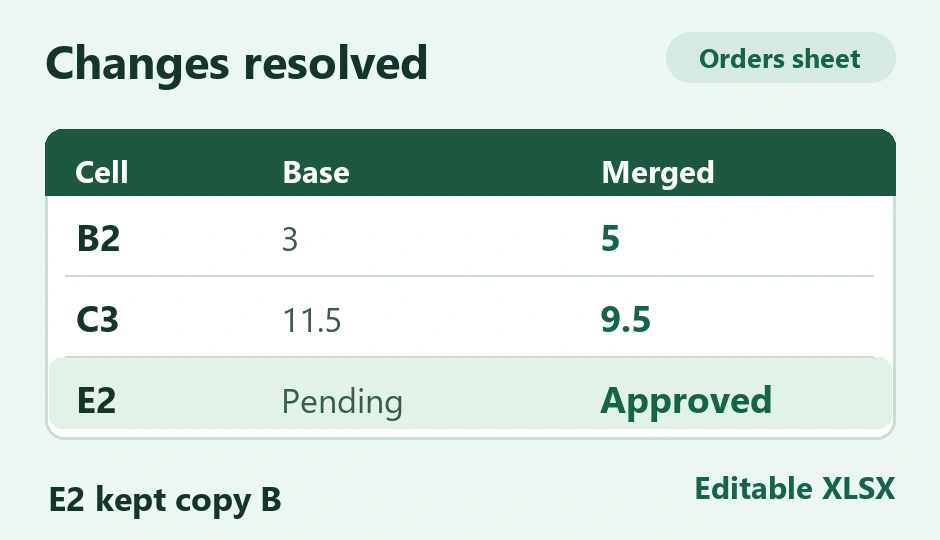
The sample is a group of three real Excel workbooks. After choosing copy B for the conflict, Excel opened the combined XLSX and recalculated the order totals. An independent reader checked the formulas and worksheet structure.
| Tool | What it does |
|---|---|
| Sheet Merge | The sample is a group of three real Excel workbooks. After choosing copy B for the conflict, Excel opened the combined XLSX and recalculated the order totals. An independent reader checked the formulas and worksheet structure. |
| xlCompare Professional | Paid Excel comparison and merge features. |
| RowPrep | Free local three-way table merge with CSV or TSV as the output. |
The links describe each alternative's documented workflow.
$0
Open a sample or your own files and inspect the result before deciding whether to export.
US$9 per workbook merge
Pay once to download the full result shown in your preview.
Already paid? Restore your purchase.
Yes. Choose the original workbook and the two edited copies in their labeled slots.
Use copies with the same structure. Layout changes fall outside the supported workflow.
Ordinary formulas are supported. Review and recalculate the output in Excel.
Set a decision for every unresolved conflict, then run the preview again.
The preview is free. Each workbook merge is US$9, charged once at download.
Your files are processed in your browser. Stripe handles checkout separately.
No account is needed. Complete Stripe Checkout and return to this browser to download the result.
Open this tool in the same browser and select Restore purchase. Prepared exports are kept locally for up to seven days.
Follow the workflow and check the formats the tool supports.
See what stays in the browser and what Stripe receives at checkout.
Find out how to recover a purchase and which details to keep.
Open the tool and preview the result for free.